Coming up next: hardware accelerating PMEMD

Just to show-off. Only vvexp, vvlog, vvrsqrt and vvrec are used in this test.
 Labels:
AMBER9
Labels:
AMBER9
Just to show-off. Only vvexp, vvlog, vvrsqrt and vvrec are used in this test.
Labels:
AMBER9
Okay, this time I am going to do a step-by-step document of compiling AMBER 9 PMEMD on the Mac. But I still think compiling this kind of thing requires some consultant fees as a reward for your lovely technical guys around.
If you use intel ifort on Mac OS X, please refer the documentation of linux to use linux p4 option.
For g95/gfortran (intel), save this following piece of text into "pmemd/config_data/macosx_intel.g95", and run "./configure macosx_intel g95 nopar" to generate required config.h file. If you are using ppc CPU, just get rid of -msse3 and use the file of macosx_ppc.g95 and change the argument respectively.
DIRFRC_DEFINES = -DDIRFRC_COMTRANS -DDIRFRC_EFS
CPP = /usr/bin/cpp
CPPFLAGS = -traditional -P
F90_DEFINES = -DFFTLOADBAL_2PROC

F90 = g95
MODULE_SUFFIX = mod
F90FLAGS = -c
F90_OPT_DBG = -g -ftrace=full
F90_OPT_LO =  -O0
F90_OPT_MED = -O2
F90_OPT_HI =  -O3 -msse3
F90_OPT_DFLT =  $(F90_OPT_HI)

CC = gcc
CFLAGS = -DDBL_C_UNDERSCORE

LOAD = g95
LOADFLAGS =
LOADLIBS =
macosx_pcc.xlf90 file for Mac OS X 10.4 (tiger) ppc using IBM xlf90
setenv PREPROCFLAGS "-DDIRFRC_BIGCACHE_OPT -DNO_C_UNDERSCORE"

setenv CPP /opt/ibmcmp/xlf/8.1/exe/cpp

setenv OPT_LO  "xlf90 -qsuffix=f=f90 -qdpc -qmaxmem=-1 -qarch=auto -c"
setenv OPT_MED "xlf90 -qsuffix=f=f90 -qdpc -qmaxmem=-1 -O2 -qarch=auto -c"
setenv OPT_HI  "xlf90 -qsuffix=f=f90 -qdpc -qstrict -O3 -qarch=auto -c"

setenv LOAD "xlf90 -qdpc -qarch=auto"
setenv LOADLIB
Labels:
AMBER9
Yes, I am late reading the AMBER reflector again. This time Dr. Langsetmo brought up this issue in May 2007:
everything went well, and in the testing most things passed, till a failure at:My PASSED rdc test on absoft Pro fortran compiled sander shows that the problem is on XL Fortran. After several small scale searches, I found that it can be avoid by getting rid of the old namelist compatible flag from the XLFRTEOPTS options. Normally the environment XLFRTEOPTS was set to "namelist=old:xrf_messages=no", I used "xrf_messages=no" for this test:cd rdc; ./Run.dip STOP 1 ./Run.dip: Program error make: *** [test.sander.BASIC] Error 1if look at rdc/gcg.dip.o i find at the end of the file:Alignment info will be read from file: RST.dip Here are comments from the alignment input file: namelist reports error reading &aligni do have the environment variable:XLFRTEOPTS=namelist=old:xrf_messages=noso i don't understand the error. any help would be appreciated.
% env XLFRTEOPTS="xrf_messages=no" ./Run.dip
STOP 0
diffing gcg.dip.o.save with gcg.dip.o
PASSED
==============================================================
From 2007 archive of the AMBER mail reflector:
or in 2006Starting installation of Amber9 (serial) at Wed Oct 17 18:30:45 PDT 2007. cd lib; make install g95 -o new2oldparm new2oldparm.o nxtsec.o ld: new2oldparm.o bad magic number (not a Mach-O file) ld: nxtsec.o bad magic number (not a Mach-O file) make[1]: *** [new2oldparm] Error 1
This error is more likely due to the existing old *.o files from other computer. Please always do aStarting installation of Amber8 (serial) at Mon Mar 27 14:42:01 EST 2006. mkdir ../exe mkdir: ../exe: File exists make: [serial] Error 1 (ignored) cd lib; make install xlf90 -qextname=ddot:fdate:flush:lsame:dscal:dnrm2:idamax:drot:dswap:dspmv:daxpy:\ dspr2:dgemm:dcopy:dgemv:dtrmv:dtrmm:dger:lsame:dspev:dgeev:dspevd:dsyev:dppsv:\ dspsv:dlamch:dsteqr:dgeqr2:dorm2r:dlacpy:dlarnv:dlascl:dlaset:dlartg:dlanst:dlaev2:dlapy2:\ dlasr -o new2oldparm new2oldparm.o nxtsec.o /usr/bin/ld: new2oldparm.o bad magic number (not a Mach-O file) /usr/bin/ld: nxtsec.o bad magic number (not a Mach-O file) make[1]: *** [new2oldparm] Error 1 make: *** [serial] Error 2
make cleanbefore you start to compile.
A friend of mine asked me about how come his PMEMD compiled with MPI doesnot contain suffix of .mpi that kind of thing. Actually if anyone check the Makefile of PMEMD, he/she will know that there is no such default filename suffix.
pmemd: $(NETCDF_MOD) $(OBJS)
        $(LOAD) $(LOADFLAGS) -o $@ $(OBJS) $(FFT_LIBS) \
        $(NETCDF_LIBS) $(MATH_LIBS) $(MPI_LIBS) $(LOADLIBS)
Where $@ means the name of this makefile rule, which is "pmemd".
Labels:
AMBER9
Related Question:
In order to install AMBER 9 on Mac OS X operating system, you need to compile the program by yourselves. Therefore a working FORTRAN 90 compiler and a working C compiler are required. Macintosh machines nowadays come with a developer package in the DVD of Mac OS X. You can get a free and working C compiler from the disc.
For FORTRAN 90 compiler, you can get free (as in free beer / freedom) g95 executables package from the ftp site of g95. Remember you might need the cctools provided at the same place if you are using Mac OS X 10.3.
And for gnu fortran (also free as in free beer / freedom), you probably need to compile the stuff by yourself with darwinports or fink to get newer version. Of course, it's always easier just getting the pre-built binaries from here despite I prefer doing it by myself. I personally haven't checked the current version of gfortran and therefore you are on your own to check if it's working with AMBER 9.
For IBM XL compilers, both C++ and FORTRAN compilers are available for reasonable educational price (for a computing lab) from ABSoft fortran store.
Also check out the intel compilers if you have Intel CPU based Macintosh like Mac Pro or new iMac. As a matter of fact, I highly recommend this compiler!
(updated: added a related question entry in the front)Just for your information:
AMBER_SRC=~/amber9/src
AMBERBUILDFLAGS=
LOCALFLAGS=
USE_BLASLIB=$(VENDOR_SUPPLIED)
USE_LAPACKLIB=$(VENDOR_SUPPLIED)
USE_LMODLIB=$(LMOD_UNAVAILABLE)
CC= gcc
CPLUSPLUS=g++
CFLAGS= -D_FILE_OFFSET_BITS=64 -D_LARGEFILE_SOURCE -O2 -m32
CPPFLAGS= $(AMBERBUILDFLAGS)
FPPFLAGS= -P -xassembler-with-cpp -DHASSECOND $(AMBERBUILDFLAGS)
FPP= cpp -traditional $(FPPFLAGS)
FC= g95
FFLAGS= -O0 -fno-second-underscore $(LOCALFLAGS) $(AMBERBUILDFLAGS)
FOPTFLAGS= -O3 -fno-second-underscore $(LOCALFLAGS) $(AMBERBUILDFLAGS)
FREEFORMAT_FLAG= -ffree-form
LOAD= g95  $(LOCALFLAGS) $(AMBERBUILDFLAGS)
LOADCC= gcc  $(LOCALFLAGS) $(AMBERBUILDFLAGS)
LOADLIB=-Wl,-framework -Wl,Accelerate
LM= -lm
LOADPTRAJ= g95 $(LOCALFLAGS) $(AMBERBUILDFLAGS)
XHOME= /usr/X11R6
XLIBS= -L/usr/X11R6/lib
#------------------------------------------------------------------------------
#  Other stuff:
#------------------------------------------------------------------------------
.SUFFIXES:  .f90
EMPTY=
AR=ar rv $(EMPTY)
M4=m4
RANLIB=ranlib
SFX=
NETCDF=
NETCDFLIB=
MODULEDIR=-I
MAKEDEPEND=$(AMBER_SRC)/../bin/amber_makedepend
SLKO=skipDFTB

#  default rules for Fortran and C compilation:

.f.o:   $$<
        $(FPP) $$< $> _$$<
        $(FC) -c $(FFLAGS) -o $@ _$$<

.c.o:
        $(CC) -c $(CFLAGS) $(CPPFLAGS) -o $@ $<
AFAIK, Apple has not declared a standard line ending for Mac OS X even now. But the convention of MacOS 9 is using CR (a single Carriage-Return character) while the nature of UNIX in Mac OS X is favoring LF (a single Line-Feed character) as the default line ending. Also the line ending of DOS/Windows is CRLF (a Carriage-Return + Line-Feed pair).
Both DOS and MacOS 9 line endings show ^M under UNIX but different style. Therefore if you use LEaP to import text file (e.g. PDB file) from Windows or from Mac, it's highly possible that LEaP doesn't like the format at all. The "default" text editor in Mac OS X TextEdit.app can recognize either of the 3 kind of the line ending but it probably simply us CR.
From the AMBER Mail Reflector, Professor Di Giorgio complaint about the problem loading PDB file in LEaP program, and I checked the file the professor posted on the reflector, I not only found CR endings also separated LF endings! So I recommend to use a perl script (I call it: mac2unix) to fix the problem,
#!/usr/bin/perl -pi
chomp;
s/\r/\n/g;
Use nano command to create this file, and then
chmod +x this file. Later you can just do ./mac2unix Desktop/znnew.pdb to convert the line endings.
References:
Labels:
AMBER9
Basically AMBER 9 compiles perfectly with Absoft Pro Fortran (my evaluation copy is version 9.2), you can just launch:
% ./configure -nopar absoft
% make serial
The binaries generated from here passed most of the test under amber9 except noesy related tests and antechamber tests. These two can be problematic even in other compilers, so I'll leave it there for now. If anyone has any further problem, just post in the amber user mailing list.
This example has been tested on ppc machine with XL FORTRAN compiler. Strange enough, xlc is not working at this point, AMBER 9 only needs F90 compiler support from LAM anyway. These are the commands:
% env FC=xlf_r F77=xlf_r LDFLAGS=-lSystemStubs ./configure --with-rsh="/usr/bin/ssh -x" --prefix=/Users/johndoe/opt/lam --with-memory-manager=none

% make

% make install
Following example has been tested on intel core duo machine with Intel FORTRAN compiler. These are the commands:
% env FC=ifort F77=ifort ./configure --with-rsh="/usr/bin/ssh -x" --prefix=/Users/johndoe/opt/lam

% make

% make install
AMBER 9 can be built with solely xlf90 but without xlc. In order to do so, just do ordinary ./configure -nopar xlf90_macosx and replace "xlc" in the config.h file with "gcc". But this probably will cause following problem when compiling ptraj:
/usr/bin/ld: warning multiple definitions of symbol _second
second.o definition of _second in section (__TEXT,__text)
/System/Library/Frameworks/Accelerate.framework/Versions/A/Fra
meworks/vecLib.framework/Versions/A/libLAPACK.dylib(single mod
ule) definition of _second

/usr/bin/ld: Undefined symbols:

_fprintf$LDBLStub

_printf$LDBLStub

_fscanf$LDBLStub

_sprintf$LDBLStub

_sscanf$LDBLStub

_vfprintf$LDBLStub

make: *** [rdparm] Error 1
Labels:
AMBER9
# From $LAM_HOME/lam-7.1-xlf/etc/lam-bhost.def
#farq046c cpu=1
#murasaki cpu=2
localhost
# It's somehow okay to be lazy about cpu count, but it's
# highlyrecommended to add cpu={cpucount} when having
# multiple nodes defined
FYI: the host definition can be added to the /etc/hosts file or $LAM_HOME/etc/lam-hostmap.txt file.
% lamboot -v machinefile% mpirun -ssi rpi sysv -np 2 {command}
% mpirun -ssi rpi tcp -np {# of cpus to run} {command}% cd $AMBERHOME/test/4096wat
% env TESTsander=../../exe/sander.MPI DO_PARALLEL="mpirun -ssi rpi sysv -np 2" ./Run.pure_wat% cd $AMBERHOME/test % env DO_PARALLEL="mpirun -ssi rpi sysv -np 2" make test.parallel
lamhalt# hostname:{# of processors you want to run for this host}
# like:
# 192.168.0.1:2
# or just use multiple hostname like:
192.168.0.1
192.168.0.1
These hostnames also imply the routing to the nodes in the case of running across the network...
% cd $AMBERHOME/test
% env DO_PARALLEL="/opt/mpich/bin/mpirun -arch smp -machinefile /tmp/machinefile -np 2" make test.sander.BASIC.MPI
'env P4_SOCKBUFSIZE=524288' in front of the mpirun argument like this:% cd $AMBERHOME/test
% env P4_SOCKBUFSIZE=524288 DO_PARALLEL="/opt/mpich/bin/mpirun -machinefile /tmp/machinefile -np 2" make test.sander.BASIC.MPI
Labels:
AMBER9
When compiling xleap under certain version of developer tools, you might encounter such error message:
gcc -o xaLeap basics.o sysdepend.o stringExtra.o varArray.o getline.o avl.o pdb_format.o pdb_read.o pdb_sprntf.o pdb_sscanf.o pdb_write.o vector.o zMatrix.o sort.o bag.o hash.o dictionary.o database.o nVector.o ring.o matrix.o fortran.o displayer.o assoc.o atom.o byteArray.o collection.o container.o internal.o list.o loop.o molecule.o oDouble.o oInteger.o oString.o objekt.o parmSet.o residue.o unit.o unitio.o tripos.o graphUtil.o select.o amber.o build.o elements.o library.o chirality.o minimizer.o model.o parmLib.o pdbFile.o tools.o variables.o parser.o help.o helptext.o octree.o commands.o mathop.o block.o restraint.o hybrid.o xTank.o xAction.o x3d.o xBasics.o xaLeapc.o xaUnitEditor.o xaTable.o xaAtomTable.o  XrawRegistr.o xaCommand.o xaTools.o xaAtomParmTable.o xaBondParmTable.o  xaAngleParmTable.o xaParmEditor.o xaTorsionParmTable.o xaImproperParmTable.o  xaHBondParmTable.o ../ Xraw/libXaw.a ../Wc/libWcLeap.a ../Xpm/libXpm.a ../Xmu/libXmu.a -L /usr/X11R6/lib -lXt -lXext -lSM -lICE -lX11 -lm -lpthread


/usr/bin/ld: -L: directory name missingld (the ld on my iMac Core Duo and an user reported that an iMac G5 also has that.). make command: to eliminate the space character between -L and /usr/X11R6/lib. This should solve the problem.% cd amber9/src % curl http://amber.scripps.edu/bugfixes/9.0/bugfix.3 -o /tmp/bugfix.3 % patch -p0 -N -r patch_rejects < /tmp/bugfix.3
Labels:
AMBER9
For years my impression was that prebuilt binaries for something like MPI library only bring me troubles, therefore I normally recommend compiling MPI library by ourselves. Take this prebuilt mpich package from hpc.sourceforge.net for example:
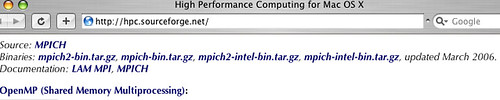
This doesn't work with AMBER 9. Several reasons that this is not working with
env MPI_HOME=/usr/local/mpich ./configure -mpich xlf90_macosx
are:
/usr/local/mpich/bin/mpif90 -show is not working, the configure script is not happy. (i.e. This mpich has to be configured with f90 option.)
When it goes to LAM-MPI, you might think that the official build from lam-mpi homepage should be working:
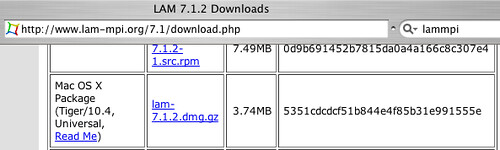
Unfortunately this doesn't work with AMBER 9, either. The reason is similar, no FORTRAN options were compiled into the package. (see the output of /usr/local/bin/mpif77 -showme)
Then I stumbled across another build from York University:
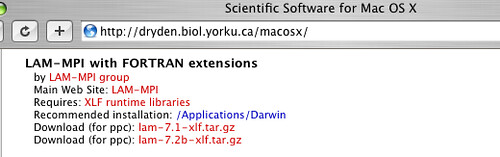
This seems to be working. These steps are required:
mkdir -p /Applications/Darwin; tar zxvf lam-7.1-xlf.tar.gz -C /Application/Darwin/ (Not everyone can write to /Applications/, so it's not very ideal for ordinary endusers of a Macintosh cluster.)
make parallel:/usr/bin/ld: table of contents for archive: /Applications/Darwin/lam-7.1-xlf/lib/liblammpio.a is out of date; rerun
ranlib(1) (can't load from it)
/usr/bin/ld: table of contents for archive: /Applications/Darwin/lam-7.1-xlf/lib/liblamf77mpi.a is out of date; rerun
ranlib(1) (can't load from it)
/usr/bin/ld: table of contents for archive: /Applications/Darwin/lam-7.1-xlf/lib/libmpi.a is out of date; rerun
ranlib(1) (can't load from it)
/usr/bin/ld: table of contents for archive: /Applications/Darwin/lam-7.1-xlf/lib/liblam.a is out of date; rerun
ranlib(1) (can't load from it)
make[1]: *** [sander.MPI] Error 1
make: *** [parallel] Error 2ranlib /Applications/Darwin/lam-7.1-xlf/lib/*.a".
Some friends might find that the AMBER 9 compilation fails and gives some errors like this:
xlf90_r -qfree=f90 -o sander.MPI [skipped a lot of *.o obj]  ../lmod/lmod.a  ../lapack/lapack.a ../blas/blas.a  ../lib/nxtsec.o ../lib/sys.a -L/usr/local/mpich/lib -lpmpich -lmpich -lpmpich -lmpich -Wl,-framework -Wl,Accelerate

/usr/bin/ld: Undefined symbols:

_mpi_bcast

_mpi_irecv

**********

***OMIT***

**********

_mpi_waitany

_mpi_waitall

_mpi_type_free

make[1]: *** [sander.MPI] Error 1

make: *** [parallel] Error 2
Here we need to check first of all if the library we are linking (red colored in the error log above.) exists. But in case you don't even have those red colored argument, your pre-built MPI library is not working. If the library files indeed exist, use "nm" command to check the names of the functions. For example:
nm /usr/local/mpich/lib/libmpich.a | grep mpi_type_freeIf the result is
00000000 T _mpi_type_free_, then you can add some argument to tell xlf90 you need to add a trailing underscore to the function name you want to.
make -e AMBERBUILDFLAGS="-qextname=mpi_bcast:mpi_irecv:...skipped..."but for
00000000 T _mpi_type_free__ (two trailing underscores), please just give up and build your own library instead.
Labels:
AMBER9
According to the AMBER reflector, there were several people reporting[1], [2] compilation problem in nmr_aux directory.
/usr/bin/ld: can't open: NULL (No such file or directory, errno = 2)
Although for some reason it doesn't seem to be affecting me, but the solution can be found at ABSoft's technical archives[3]. Basically it's like changing /etc/opt/ibmcmp/vac/6.0 from the line crtbegin = NULL to #crtbegin = NULL
Then try to compile it again. If you don't have the permission to change the file, you can copy the vac.cfg file to your own directory and modify that file. (say, your home directory) Then change the xlc argument to
xlc -F/Users/youraccountname/vac.cfgin amber9/src/config.h file....
The benchmark data goes here. (mjhsieh also gave his ifort testimonial to Intel, it probably will show up somewhere in their advertisements...)
| PMEMD 9.0 | Sander 9.0 | |||
| cpus | Ps/day | Speedup | Ps/day | Speedup |
| 1 | n/a | n/a | 47.04 | 1.00 |
| 2 | n/a | n/a | 83.66 | 1.78 |
| PMEMD 9.0 | Sander 9.0 | |||
| cpus | Ps/day | Speedup | Ps/day | Speedup |
| 1 | 110.58 | 1.00 | 66.71 | 1.00 |
| 2 | 186.21 | 1.68 | 111.48 | 1.67 |
4×2 Xeon 3G HTT | Total time 1993.87 (noMKL/MPICH/GbE)
4×  Xeon 3G HTT | Total time 3016.86 (w_MKL/MPICH/p4shmem)
2×  Core Duo 2G | Total time 3203.11 (w_MKL/LAM/SYSV)
2× Pentium D 3G | Total time 3389.14 (w_MKL/LAM/SYSV)
2× Pentium D 3G | Total time 3423.32 (w_MKL/MPICH/p4shmem)
1×  Core Duo 2G | Total time 5633.56 (w_MKL/noMPI)
1× Pentium D 3G | Total time 6367.24 (w_MKL/noMPI)
Labels:
AMBER9
Normally you just use following commands to compile AMBER 9 on intel based macintosh:
% ./configure -nopar ifort_macosx
% perl -pi -e 's/-L \/usr\/X11R6\/lib/-L\/usr\/X11R6\/lib/' config.h
% make serial
The reason getting rid of the space before /usr/X11R6/lib is that Mac OS X on intel based macintosh does not like space between the path and "-L"..... Don't blame me for forgetting this minor issue. It's more like to be fixed in next patch. :-) If you like to use intel math kernel library, use these:
% env MKL_HOME=$MKL ./configure -nopar ifort_macosx
% perl -pi -e 's/-L \/usr\/X11R6\/lib/-L\/usr\/X11R6\/lib/' config.h
% make serial
For compiling with parallel library, here is an example:
% env MPI_HOME=/opt/lam MKL_HOME=$MKL ./configure -lam ifort_macosx
% perl -pi -e 's/-L \/usr\/X11R6\/lib/-L\/usr\/X11R6\/lib/' config.h
% make serial
(My lam/mpi was installed at /opt/lam, change it to your own lam path.) For more information about the parallel library, try to figure it out from other macintosh resource, I can't promise writing one since it's a little bit tedious...
Labels:
AMBER9
Basically AMBER9 provides you an out of box compatibility on PPC Macintosh if you use IBM XL compilers. What you need to do is:
% ./configure -nopar xlf90_macosx
% make serial
With this modification, the test (make test.serial) passes without failure. However, even if you don't apply this patch, you can still get an almost working config.h ...
One noticeable change of this patch is that the underscore extension name for blas/lapack function calls are no long required probably because the current library provided by Apple (10.4.5) already took care of that.
If you don't have XL C compiler, you might have trouble compiling it. This issue is fixable, but if you are having trouble modifying config.h by yourself, please drop your question in the AMBER mail reflector.
For parallel computing, I recommend LAM-MPI for now. See Warner's tutorial when compiling LAM. As to the linking issue, I'll address this more later.
Also some might experience the problem of not finding a NULL file with XL C. Please read the later post here.